Black and White Aesthetic AI Portrait Prompt Tutorial
Creating compelling artwork inside generative engines requires a shift from generic adjectives toward precise environmental descriptions. While color-heavy portraits often dominate feeds, nothing captures intense human emotion quite like a black and white aesthetic AI portrait prompt. This structured approach leverages high-contrast greyscale values and strategic light falloffs to reveal raw, authentic expressions that feel like premium, real-world gallery photography.
The main challenge with standard AI configurations is their tendency to over-smooth facial structures, producing plastic-looking skin. By explicitly controlling directional lighting matrices, texture grain, and subject mechanics, you can force the rendering engine to output publication-ready assets natively.
The Power of High-Contrast Monochrome AI Art
Monochrome image generation isn't merely stripping color away; it is about reconstructing how light shapes shadows. Without color to distract the viewer, the focus shifts entirely to structural symmetry, facial expressions, and micro-details like hair volume and fabric creases.
High-contrast photography uses deep black values paired with sharp, isolated highlights. This structural design adds immediate cinematic depth, turning a standard profile generation into a moody, high-end fine art piece.
Key Elements of the Intense Profile Composition
To successfully code an intense, professional-grade monochrome portrait, the layout instruction prioritizes three precise execution metrics:
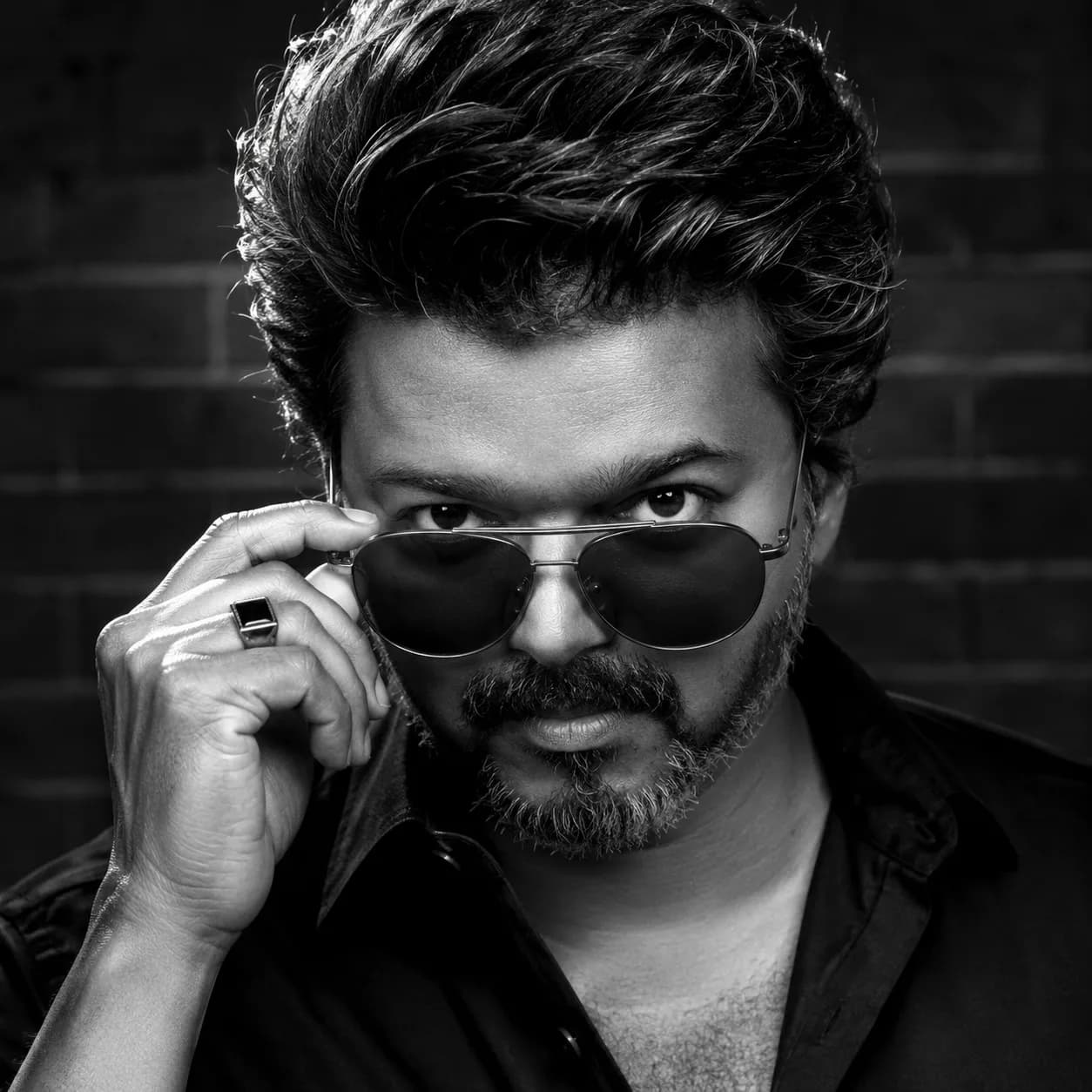
The Direct Gaze Mechanism: Forcing the subject to look directly into the camera lens instantly builds visual tension and an undeniable human presence.
The Interactive Gesture: Adding micro-actions—like lowering a pair of aviator sunglasses with one hand—breaks up stiff, robotic postures and injects natural narrative weight.
Top-Oblique Directional Lighting: Directing the main light source from a top-angled position cleanly illuminates the nose bridge, forehead, and knuckles while leaving the background in deep shadow.
The Official Black & White Aesthetic Portrait Prompt (Copy-Paste)
To generate this high-contrast studio look, copy the professionally organized prompt text block below into your active artificial intelligence terminal.
Staging the Details: Hand Position & Sunglass Mechanics
Generating hand interactions reliably can be challenging for standard AI engines. To ensure flawless execution, our script combines the action directly with an object ("lowers sunglasses down his nose with his right hand"). This context gives the model a clear spatial map to anchor the hand, reducing the risk of anatomical clipping or clipping artifacts.
Similarly, specifying fine details like a "square signet ring" or a "double bridge bar" keeps the AI focused on micro-renderings, ensuring the final output remains sharp, crisp, and believable.
Advanced Settings for Flawless Texture Resolution
Enforce High Dynamic Range: Ensure your model properties emphasize deep black values rather than muted grey tones to secure a true high-contrast look.
Lock Aspect Ratio to 1:1: The square layout grid maximizes the close-up profile composition, making it ideal for avatar displays and art prints.
Protect Skin Porosity: Avoid generic beautification keywords. Instead, rely on descriptors like "photorealistic studio photography style" to preserve realistic skin grain.
Frequently Asked Questions (FAQs)
Can I apply this prompt string to female portrait models?
Absolutely. Swap out the gender pronouns and descriptive features (e.g., replace beard/mustache with specific hairstyles or accessories) while retaining the structural lighting and sunglass mechanics.
Why is the AI background rendering too bright?
If the background appears too light, double-check that your model isn't adding ambient fill lights. Re-emphasize phrases like "deep shadow" and "dark out-of-focus brick wall" to correct the exposure balance.
Which generation tool works best for this specific style?
Midjourney V6 excels at processing micro-textures like hair and skin grain, while Stable Diffusion allows for precise control over the directional lighting angles.
Final Overview
Mastering dramatic monochrome photography comes down to controlling your values and details. By prioritizing high-contrast light placement, clear hand interactions, and realistic textures over generic style tags, you can consistently generate gallery-ready portraits directly from your AI toolkit.
For more optimized art prompts, digital workflows, and instant asset codes, connect with our central archive panel link: @all_tech_tamil