Premium Birthday Collage Poster AI Prompt Guide: Elegant Magazine Style
Personalized commemorative designs have evolved significantly beyond generic clip art graphics and overused font presets. Today's design landscape demands a minimalist approach, leaning heavily toward sophisticated, publication-grade portraiture. Utilizing a premium birthday collage poster AI prompt allows digital designers to bypass tedious manual layout slicing while executing a striking contrast between retro monochrome elements and vivid lifestyle close-ups.
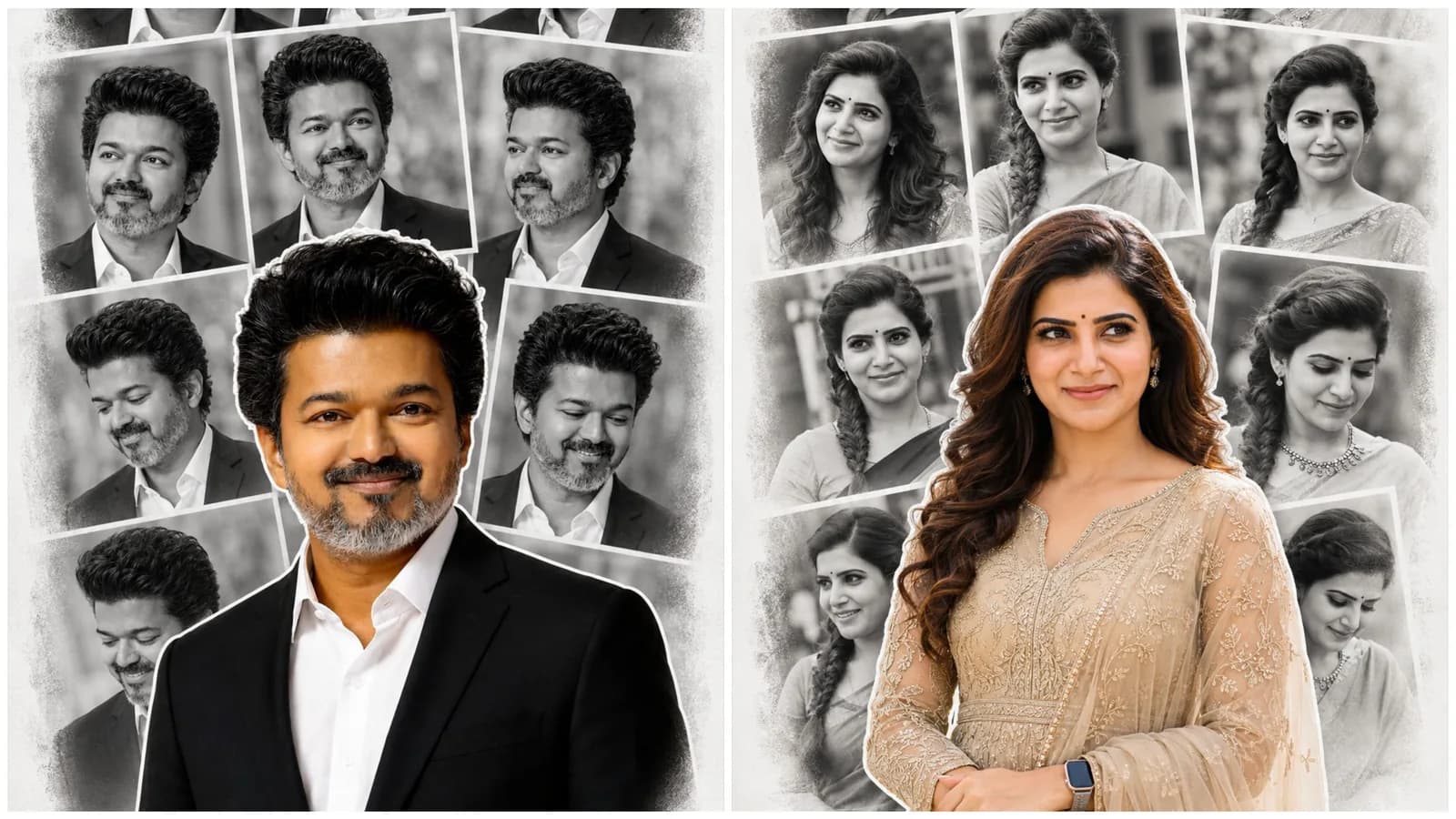
This deep structural prompt system establishes a clear visual hierarchy. By laying down an organic, desaturated background framework and anchoring it with a highly detailed, sharp full-color foreground focal point, the final print matches the design quality of high-end global fashion magazines.
The Rise of High-End Editorial Layouts in AI Art
Modern visual trends on lifestyle platforms heavily favor minimal luxury aesthetics over cluttered configurations. The "Magazine-Style Collage" owes its success to a careful balance of tones. By pairing a muted, black-and-white background grid with a high-saturation foreground subject, the viewer's eye is instantly drawn to the main portrait without losing the nostalgic feel of the supporting background photos.
This layout formula avoids relying on generic "Happy Birthday" text overlays. Instead, it lets the high-fashion styling, sophisticated poses, and premium textures tell the story, making the final artwork suitable for long-term home framing and high-resolution gallery printing.
Structural Breakdown: Layering Grids and Foreground Cutouts
To successfully communicate this complex, multi-layered layout to an AI image engine, the instructions are split into three critical design pillars:
The Desaturated Background Matrix: Instructs the generator to assemble a soft, matte-textured paper canvas filled with an overlapping grid of candid black-and-white images.
The Vignette and Edge Treatment: Applies subtle white borders and a soft vignette around the collage blocks to mimic high-end physical scrapbook arrangements.
The Color Sticker Cutout Anchor: Commands the engine to overlay a sharp, full-color foreground portrait in the center lower-third, complete with a clean sticker outline and a soft drop shadow for proper spatial depth.
The Official Premium Birthday Collage AI Prompt (Copy-Paste)
To generate this luxury layout sequence, copy the precise structural script provided in our dedicated, copy-ready container block below:
Workflow Roadmap: Managing Identity and Face Locks
When dealing with a complex layout containing multiple variations of the same subject within a single frame, maintaining consistent facial features is vital. Follow this checklist to ensure stability:
Step 1: Upload a High-Definition Anchor Reference
Pick a front-facing, high-resolution portrait that clearly displays your target subject's facial structure, hair volume, and natural smile line parameters.
Step 2: Initialize Your Image Weights
Input the reference link within tools like Midjourney or Stable Diffusion. Set your character reference weights to their maximum value to force the engine to replicate the exact same facial model across both the background panels and the main foreground cutout.
Step 3: Post-Processing Typography Addition
Because the script intentionally blocks text generation to maintain clean image outputs, you can import the finalized generation into software like Photoshop or Canva to add clean, elegant serif typography for names or dates.
Common Graphic Alignment Mistakes to Monitor
Altered Color Bleeding: Ensure the black-and-white panels remain fully desaturated. If color leaks from the foreground into the background grid, re-emphasize the phrase "monochrome background" in your generation engine.
Over-Smoothing Intricate Embroidery: The prompt uses clear terms like "intricate threadwork" to protect texture data. Avoid using basic beauty filters that erase these luxurious details.
Mismatched Lighting Profiles: The lighting across both the collage panels and the main foreground cutout must look natural. Avoid clashing light angles to ensure the composition blends seamlessly.
Frequently Asked Questions (FAQs)
Can I swap the champagne-beige gown for other clothing styles?
Yes. Simply open the copy-ready code block above and replace the dress descriptions with alternative styling choices like traditional sarees, business suits, or casual wear.
Which AI engines support this specific multi-layered layout?
Midjourney V6 handles the complex combination of monochrome and color elements exceptionally well, while Stable Diffusion provides great control over the cutout's drop shadow and sticker outline properties.
How do I scale this image up to a large physical print size?
Since the prompt requests "ultra-detailed, print-ready, high DPI" outputs, you can easily process the final file through a dedicated AI upscaler to achieve a sharp, large-format physical print.
---
Summary Evaluation
Creating a premium, magazine-style birthday poster is a great showcase of advanced prompt layering techniques. By separating the image into a desaturated background grid and a vibrant foreground subject, you can easily produce high-end, gallery-ready designs. This approach moves away from tacky templates and instead delivers timeless, sophisticated commemorative artwork.
For more premium prompt frameworks, design guides, and direct workflow tools, join our central community platform channel: @all_tech_tamil