South Indian Woman AI Art Prompt: Modern Saree Poster Design Guide
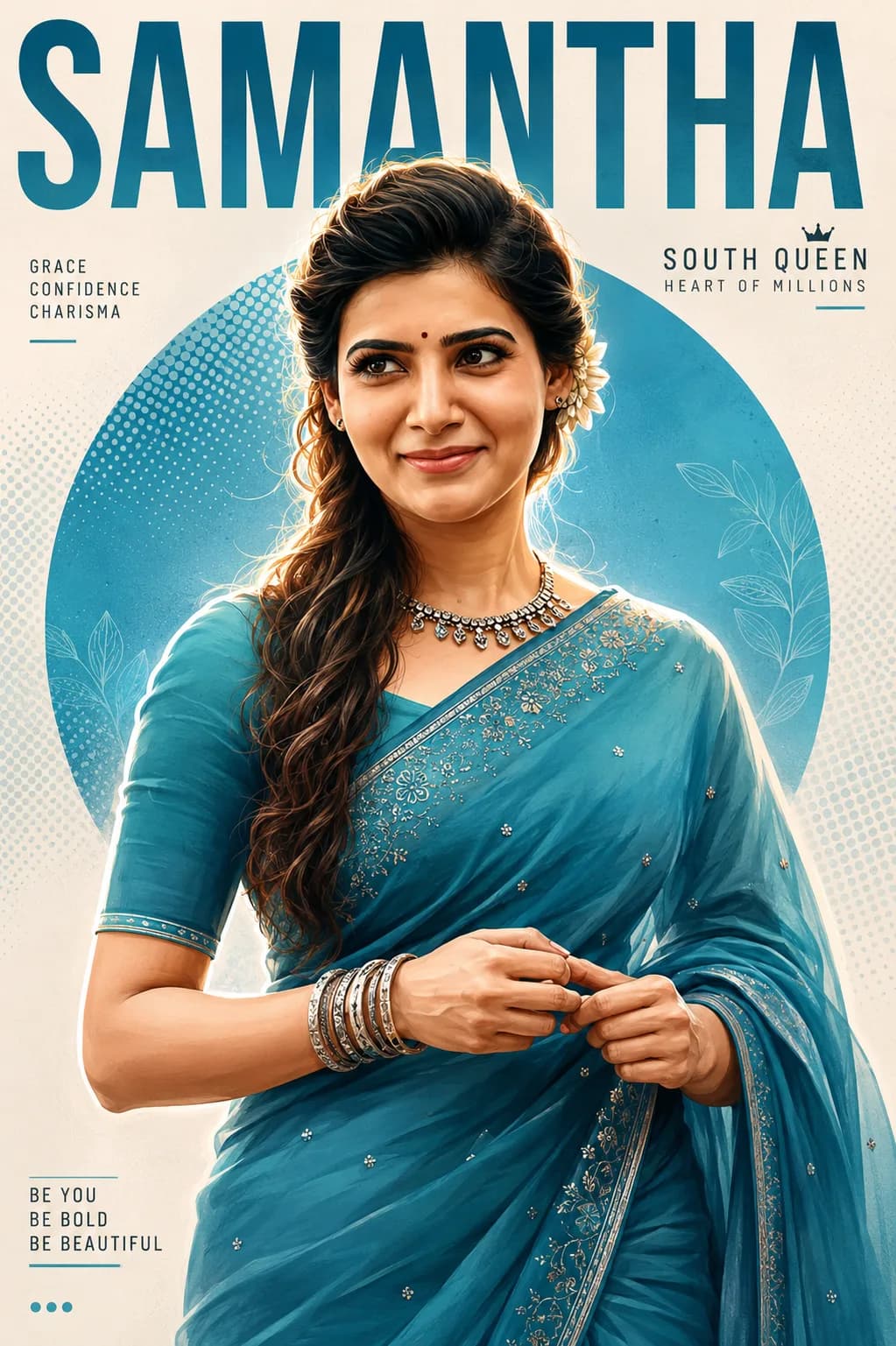
The convergence of cultural imagery and minimalist digital illustration has birthed a massive trend in creative print media. Graphic artists and prompt engineers are actively shifting away from cluttered configurations, favoring clean editorial formats instead. At the forefront of this shift is the highly sought-after South Indian woman AI art prompt structure, which produces a striking, semi-realistic poster layout ready for publishing panels.
Generating clean text elements combined with intricate clothing textures like a saree can easily confuse standard image generation algorithms. By using a structured layout command architecture that cleanly divides subject variables from geometric design backgrounds, you ensure high contrast, proper color grading, and razor-sharp line outputs every single run.
The Rise of Modern Editorial Layouts in AI Art
Traditional thematic illustrations frequently suffer from over-saturation or cartoon-like exaggeration. The modern alternative leans heavily into contemporary vector posters—relying on a clean cut-out effect, a subtle white outline tracking, and crisp geometric design backdrops. This stylistic choice emphasizes the subjects' natural features, maintaining an authentic and elegant look while injecting a fresh, minimalist graphic design tone.
The color theory here plays a vital role. Forcing high contrast between cool teal-blue fabrics and warm skin tones, accented by clean white elements and retro halftone dot overlays, generates an instant eye-catching visual hierarchy perfect for social media thumbnails or physical print media.
Deconstructing the Semi-Realistic Vector Style Matrix
To ensure your chosen image generator processes this specific aesthetic structure smoothly without degrading pixel lines, the prompt layout divides instructions into distinct structural pillars:
Subject Rendering Profile: Outlines a semi-realistic digital painting approach featuring smooth skin tones, natural clothing folds, and authentic facial proportions.
Graphic Background Elements: Commands the system engine to frame a clean circular background pattern behind the model using soft halftone texturing.
Typographic Blueprint: Directs the core architecture to allocate empty space near the top margins to anchor bold sans-serif text tags properly.
The Official South Indian Woman Saree Poster Prompt (Copy-Paste)
To duplicate this clean editorial vector style canvas, tap the button on the automated system control container below to capture the complete prompt string script:
Key Tuning Parameters for Crisp Typographic Elements
For flawless generation passes that look custom-built by an agency artist, implement this simple configuration guide:
Step 1: Enforce Aspect Ratio Rules
Always format your image output parameters to a vertical structure like 4:5 or 2:3. This provides ample vertical space for the top header typography to sit without crowding the subject's hair structure.
Step 2: Choose Your Font Generation Method
If your AI generation software generates messy typos or garbled characters in the header block, simply generate the asset with an empty minimalist background plate, then easily overlay clean text blocks using standard tools like Canva.
Step 3: Monitor Face Vector Symmetries
To avoid a plastic, artificial look, ensure your input script restricts excessive beautification layers. The term "semi-realistic digital painting" tells the generator to preserve realistic bone structure while using a smooth vector finish.
Avoid These Mistakes to Prevent Cartoon Distortion
Vague Style Commands: Using generic terms like "anime" or "cartoon" will instantly strip away the elegant, professional look. Stick strictly to "semi-realistic digital painting."
Cluttered Background Elements: Photorealistic room interiors or landscape scenes break the clean poster layout. Keep the background minimal using geometric circles and halftone filters.
Mismatched Aspect Ratios: Generating in a wide 16:9 format will squash your vertical layout, squeezing the text blocks against the model's shoulders. Always select vertical frames.
Frequently Asked Questions (FAQs)
Can I swap out the color profile parameters?
Yes. You can edit the text string directly inside the copy container. Simply exchange the word "teal-blue" for deep crimson, emerald green, or mustard yellow to change the design palette.
Which generation tool processes this modern vector style best?
Midjourney V6 processes complex layout prompts incredibly well, while DALL-E 3 handles specific text formatting and geometric shape placement with absolute precision.
How do I make the white cutout outline thicker?
You can increase the text weighting by altering the phrase to read "prominent thick white vector die-cut outline sticker effect" within your terminal script.
Summary Thoughts
The modern saree poster framework offers a highly reliable blueprint for combining classic culture with clean, minimalist design elements. By managing aspect boundaries, forcing sharp color contrasts, and locking text space zones, creators can easily generate stunning visual assets for marketing panels or online display grids.
For more premium prompt scripts, advanced system instructions, and fast design tips, check out our community link: @all_tech_tamil